Exporting workouts to Zwift
The Zwift integration is in limited testing, so it is available to selected athletes only and places are limited. If you don't see the Zwift card on your Integrations page and would like to use it, write to hello@goodcoach.app.
Activating export to Zwift
To send planned workouts to Zwift, the athlete connects their Zwift account in the Good Coach App: open Integrations, open the Zwift card, click "Connect" and log in to Zwift. See Zwift integration details. There is nothing else to switch on: from then on every structured cycling workout the coach publishes goes to Zwift.
How does it work?
When a structured cycling workout plan is published, it is sent to the athlete's Zwift account within seconds and scheduled for its day. On that day - in the athlete's own time zone - Zwift suggests it on its home screen, so the athlete can start it straight away. A competition with structured intervals is sent the same way.
Workouts are sent as soon as the coach publishes them, however far ahead they are planned, and each one is available in Zwift only on its own day. Several workouts on one day are fine - each one is scheduled separately.
To confirm a workout was sent, open the workout details in the Good Coach App and look for the green Exported to Zwift badge.
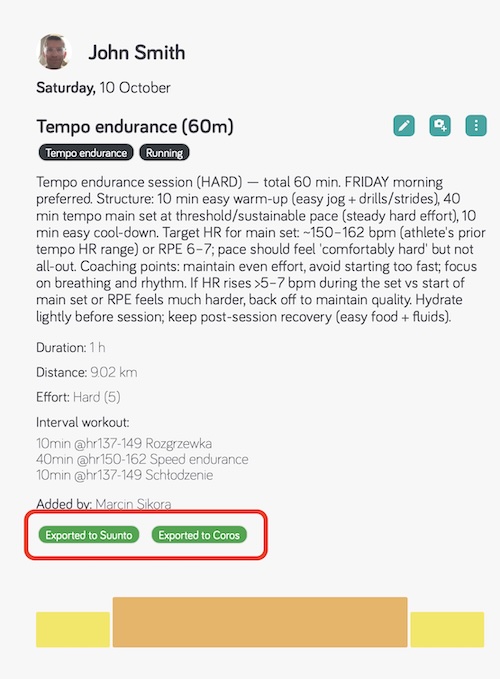
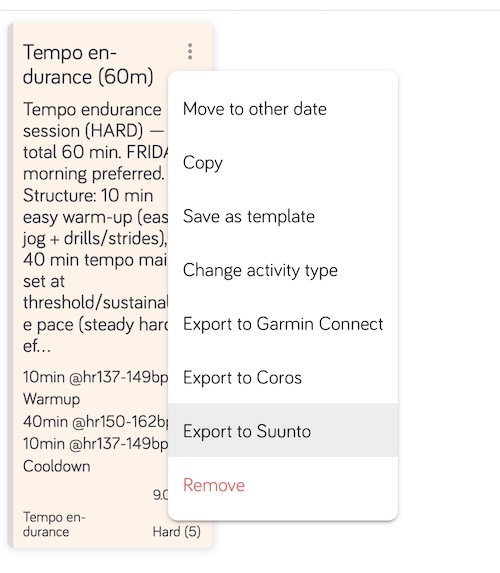
If the badge is missing, or you think something went wrong, you can send the workout again yourself: open the menu (⋮) on the workout in the calendar and choose Export to Zwift.
Changes and deletions
Zwift always holds the current version of the plan:
- Editing a workout, or moving it to another day, replaces it in Zwift.
- Deleting it, or turning it back into a draft, removes it from Zwift.
- A workout the athlete has completed stays in Zwift as it was ridden.
What gets exported
- Only structured cycling workouts. Running workouts are not sent to Zwift yet.
- Only time-based steps. Steps defined by distance or calories cannot be represented in the Zwift workout format and are skipped. If every step is distance-based, the workout is not sent at all.
- Published workouts on today or a later day. Drafts and workouts in the past are not sent.
- At most 200 segments. Zwift refuses longer workouts, so such a workout is not sent. A repeat of one work step with a power target and one rest step counts as one segment; any other repeat counts once per repetition.
While building a workout, the coach sees a Will be uploaded to Zwift badge and a short warning for every step Zwift will show differently.
How target types are converted
Zwift workouts are power-based: every step is a fraction of the athlete's FTP. When a workout uses a different target type, the Good Coach App converts it as follows:
| Target type in Good Coach App | How it appears in Zwift |
|---|---|
| Power in % FTP | Sent as the same FTP fraction |
| Power in watts | Divided by the athlete's FTP in the Good Coach App and sent as an FTP fraction |
| RPE | Converted to an estimated FTP fraction (e.g. RPE 7 = 100% FTP, RPE 5 = 75%) |
| Cadence | Sent as a cadence target alongside a power estimated from the step's intensity; a cadence range is sent as its middle value |
| Heart rate, speed, pace or none | Sent as a Free Ride step: no power target, the athlete rides at their own effort |
Zwift allows a warmup only as the first step and a cooldown only as the last one. Any other warmup or cooldown step is sent as a ramp with the same power.
Every workout sent from the Good Coach App carries the athlete's FTP from the Good Coach App, and Zwift uses it for that workout instead of the athlete's Zwift FTP. A step planned at 200 W is ridden at 200 W, whatever the athlete's FTP in Zwift is. Steps in % FTP are taken of the same FTP, so keep the athlete's FTP up to date in the Good Coach App.
If the athlete has no FTP set in the Good Coach App, Zwift uses their Zwift FTP instead, and watt targets fall back to power estimated from each step's intensity (e.g. interval steps at about 105% FTP, recovery steps at about 50%).
Troubleshooting
- The workout is not in Zwift. Check that it is a published, structured cycling workout with at least one time-based step, that its day has not passed, and that the athlete's Zwift card shows "Connected". Zwift shows it only on its own day.
- The badge is missing. Send it again from the workout menu (⋮) with Export to Zwift.
- Zwift shows different watts. Check the athlete's FTP in the Good Coach App: Zwift takes every step of the workout from it. Without an FTP set there, Zwift uses the athlete's Zwift FTP - see How target types are converted.
- More than five workouts on one day. Zwift accepts at most five overlapping workouts per day; a sixth one is not sent.