Amazfit (Zepp) integration details
Amazfit watches connect to the Good Coach App through the Zepp app, the app you use to sync your watch. Once connected, the integration can bring in two separate kinds of data: your workouts, with their full detail, and your health data. For example, after a morning run with your Amazfit watch, the workout appears in your calendar with its route, laps and heart rate as soon as the Zepp app syncs, and your coach sees it matched against the plan.
Connecting Amazfit (Zepp)
- Log in to the Good Coach App as an athlete and open Integrations (in the browser app from the menu with your name in the top right corner, in the mobile app from More (⋮) in the bottom bar). See How do I link my account to an external service? for more information.
- On the "Amazfit (Zepp)" card, click "Connect".
- The system will redirect you securely to the Zepp login page. Log in with the same account you use in the Zepp app on your phone and give the Good Coach App permission to read your data.
- Once you have successfully connected, you will return to the Good Coach App where you will see that the status on the card has changed to "Connected".
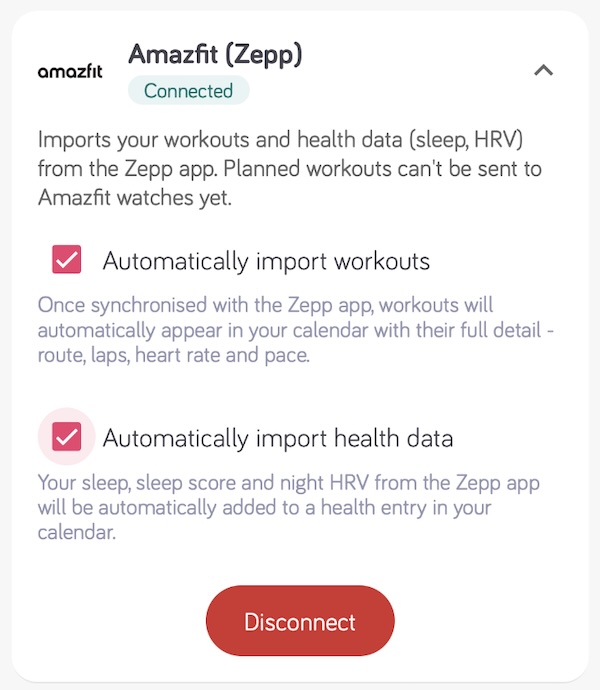
- Enable Automatically import workouts so that workouts appear in the calendar on their own. See more.
- Enable Automatically import health data if you also want sleep, sleep score and night HRV in your calendar.
Both options are off after connecting, so choose what you want to import.
Only workouts completed after the connection was made will be available to the Good Coach App. You will not see earlier workouts.
What we import from Zepp
Workouts
Completed workouts are imported from the FIT file recorded by your watch, with their full detail - duration, distance, route, heart rate, pace or power, and laps - and are matched against your plan for the day. Read more in How does importing work and Connecting activities.
A workout arrives once the Zepp app has synced it from the watch. If Automatically import workouts is off, the workout is still waiting for you and you can add it to the calendar manually.
If the same workout already came through Strava or Apple Health, the Amazfit version replaces that copy, because it carries the full recording.
If the Zepp app also sends your workouts to Strava, and automatic import from Strava is enabled in the Good Coach App, the same workout can arrive twice. Keep Automatically import workouts enabled for Amazfit (Zepp) and turn it off for Strava. The Good Coach App warns you about this when you enable it.
Sending a coach's structured workouts to an Amazfit watch is not available yet.
Health data
When Automatically import health data is enabled, we write Zepp data into the health entry for the matching day, creating the entry when it does not exist yet. Your coach sees the same entry.
| Data | Notes |
|---|---|
| Sleep duration | Total sleep reported by Zepp, without naps |
| Sleep score | Zepp sleep score, 0-100 |
| Night average HRV | Average HRV of the night, reported by Zepp |
The data arrives after the Zepp app syncs the night from your watch, and goes to the day Zepp assigns the night to - normally the day you woke up.
Zepp does not send steps, calories, floors climbed, resting heart rate or a stress level to the Good Coach App, so those fields stay empty unless another source fills them.
Each day has one health entry. If two services send health data for the same day, the later one overwrites the other's values, so your HRV can jump between two different measurements. Enable health import in one service only.
Disconnecting
Click "Disconnect" on the "Amazfit (Zepp)" card. If you remove the Good Coach App's access in your Zepp account instead, the integration is disconnected automatically, and the card shows it as not connected.
Troubleshooting
- A workout did not appear. Check that the workout is visible in the Zepp app - if not, sync the watch with the Zepp app first. Then check that Automatically import workouts is enabled on the "Amazfit (Zepp)" card.
- The same workout appears twice. Automatic import is probably enabled for both Amazfit (Zepp) and Strava. Turn it off for Strava - see Avoid duplicates.
- Health data does not arrive. Check that Automatically import health data is enabled, and that the watch was worn through the night and synced with the Zepp app.
- HRV jumps from day to day. Check that health import is enabled in one service only.
- You got a notification asking you to reconnect. Zepp no longer accepts the Good Coach App's access. Connect again on the Integrations page.
More on health import across all services: Importing health data.