Polar integration details
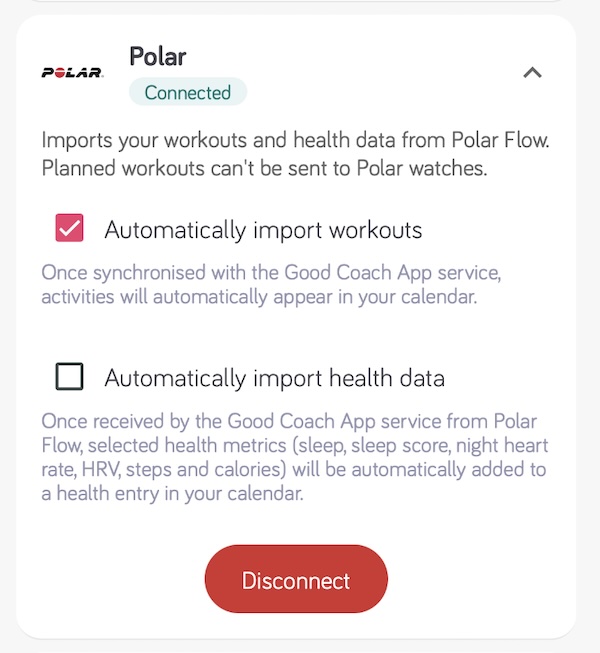
Polar connects to the Good Coach App through Polar Flow. Once connected, the integration brings in two separate kinds of data: your workouts and, optionally, your health data.
Connecting Polar
- Log in to the Good Coach App as an athlete and open Integrations (in the browser app from the menu with your name in the top right corner, in the mobile app from More (⋮) in the bottom bar). See How do I link my account to an external service? for more information.
- Open the Polar card and click "Connect".
- The system will redirect you securely to the Polar Flow login page, where you will give the Good Coach App permission to read your data.
- Once you have successfully connected, you will return to the Good Coach App where you will see that the status on the card has changed to "Connected".
- Enable Automatically import workouts so that workouts appear in the calendar on their own. See more.
- Enable Automatically import health data if you also want sleep, night heart rate and HRV in your calendar.
Only workouts completed after the connection was made will be available to the Good Coach App. You will not see earlier workouts.
Make sure you log in to Polar using the same account you use in the Polar Flow app that your watch syncs with, and accept all mandatory consents in your Polar account. Without them the workout import still works, but no health data will arrive.
What we import from Polar
Workouts
Completed workouts are imported with their full detail - duration, distance, heart rate, pace or power, and lap data - and are matched against your plan for the day. Read more in How does importing work and Connecting activities.
Polar does not accept structured workout plans from external systems, so exporting intervals to a Polar watch is not available.
Health data
When Automatically import health data is enabled, we read three Polar sources every few hours and write them into the health entry for the matching day, creating the entry when it does not exist yet. Your coach sees the same entry.
| Data | Polar source | Notes |
|---|---|---|
| Steps | Daily activity summary | Provided by Polar |
| Calories | Daily activity summary | Provided by Polar |
| Sleep duration | Sleep | Sum of light, deep, REM and unrecognised sleep stages; naps excluded |
| Sleep score | Sleep | Polar Sleep Score, 1-100 |
| Min. resting heart rate | Sleep | Lowest overnight sample, used only from 24 samples up (about two hours of monitored sleep) |
| Sleep average heart rate | Nightly Recharge, Sleep | Nightly Recharge average when available, otherwise the average of the overnight samples |
| Night average HRV | Nightly Recharge | Provided by Polar |
| Night max HRV | Nightly Recharge | Highest HRV sample, calculated by Good Coach App when Polar supplied more than 3 samples |
| Nightly Recharge status | Nightly Recharge | Polar's own status for the night, from very poor to very good. Used by Readiness |
Polar does not report resting heart rate, floors climbed or a stress level, so those fields stay empty in the health entry unless another source fills them.
Sleep score, night HRV and night heart rate come from Polar Sleep Plus Stages and Nightly Recharge. They need a Polar watch that supports those features and worn through the night - a night without the watch simply produces no entry.
How far back we look
Polar keeps sleep and Nightly Recharge data for the last 28 days and serves the whole window in one request. Normally we refresh the last few days. When we find nothing recorded for the previous day we fall back to the full 28 days, so a watch that went unsynchronised for a couple of weeks catches up on its own. Data older than 28 days can no longer be retrieved from Polar.
Troubleshooting
- Workouts arrive, health data does not. Check that Automatically import health data is enabled, and that all mandatory consents are accepted in your Polar account - a missing consent blocks health endpoints only.
- Nothing arrives at all. Polar access tokens never expire, so this usually means access was revoked in Polar Flow. Disconnect Polar in the Good Coach App and connect again.
- Sleep is there but HRV is not. Nightly Recharge needs several nights of wear before Polar starts reporting it, and it is not available on every Polar model.
More on health import across all services: Importing health data.