Athlete preferences
The athlete preferences section allows athletes to define their personal training parameters and availability, helping coaches create more effective and personalized training plans. It has three tabs: Performance data, Zones and Schedule preferences.
Coaches open it for the selected athlete from the athlete switcher, athletes from Athlete preferences in the menu.
Performance Data
Performance data consists of the athlete's basic metrics used in training planning. These metrics are essential for:
- Training zones: zones based on metrics take the athlete's values from these metrics
- Cardio load calculations: Enables proper assessment of training intensity and recovery needs
- Personalized training plans: Allows coaches to create workouts tailored to the athlete's current fitness level
The fields:
- Heart rate — maximum and resting.
- Running — 10 km time, FTP, aerobic and anaerobic threshold heart rate (LT1, LT2), anaerobic threshold pace (LT2).
- Cycling — FTP, aerobic and anaerobic threshold heart rate (LT1, LT2).
Running metrics are also used for other sports, except cycling.
Anaerobic threshold pace (LT2)
The pace the athlete could hold for about an hour — the base of zones on anaerobic threshold pace. Type it as minutes and seconds, e.g. 4:30, per kilometre or per mile as set in your settings.
The hint under the field says where the value comes from:
- From a 30-minute test on … — saved from the threshold test. Change the value by hand and the hint goes, because it no longer comes from that test. The same hint appears under anaerobic threshold heart rate.
- Not entered – zones use …, calculated from the 10k race time — the field is empty, so zones use threshold pace worked out from the 10 km time.
- … calculated from the estimated 10k time — the same, from the system's estimate. Treat it as a starting point, not a result.
System-estimated metrics
In addition to manually entered performance data, the system automatically calculates two estimated metrics based on the athlete's training history. These values are read-only — they cannot be edited by the coach or athlete and only appear when sufficient training data is available.
- Estimated 10 km running time — derived from the athlete's most recent Aerobic Efficiency (AE) coefficient results. This provides an approximate expected pace for a 10 km run. It is not a race prediction, but a practical baseline for setting running training paces. Coaches should verify this against actual performance.
- Estimated cycling speed — calculated as an average from the athlete's most recent cycling sessions. This represents a general training speed, not a peak performance indicator.
The estimated 10 km time is also the last source of threshold pace, used only when neither the threshold pace nor a 10 km time is entered.
Both values update automatically as new training data is recorded. They are used by the system to power auto-calculation of workout plan Duration and Distance when structured intervals are defined.
Calculators
The calculators turn a race or a test into the numbers your zones need. Open them from the top menu, or with the calculator icon next to the 10 km time. Where a calculator has Save in the current athlete metrics, the result goes straight into the selected athlete's performance data.
- Threshold test (LT2) — anaerobic threshold pace and heart rate from a 30- or 20-minute test.
- Pace and speed — the pace and speed needed to cover a distance in a given time.
- Pete Riegel's formula — a 10 km time predicted from the distance run in 20 minutes.
- J. Daniels' training paces — training paces, race times and training heart rate for a 10 km result.
Threshold test (LT2)
One test gives both thresholds, pace and heart rate.
- The athlete runs alone, as hard as they can hold for the whole test — 30 minutes, or 20 for newer athletes.
- Enter the distance, the average heart rate and the date of the test.
- Check the proposed values, correct them if you like, and save.
20 minutes, 4.8 km, average heart rate 175 → threshold pace 4:23 /km, threshold heart rate 166.
How each test is calculated:
| 30 minutes (Friel) | 20 minutes | |
|---|---|---|
| Threshold pace | average pace of the whole test | 95% of the average speed |
| Threshold heart rate | average of the last 20 minutes — press lap at 10 minutes | 95% of the average heart rate |
- Why 95% for 20 minutes: a 20-minute effort is run faster than one an athlete could hold for an hour. The 30-minute test needs no correction, and its first 10 minutes let the heart rate settle, which makes it the more accurate of the two.
- Your own method: if you read a test differently, change the proposed values before saving. They are only a proposal.
- The date is kept: the saved values show which test they came from, under both fields in performance data — so a test from months ago is easy to spot.
Zones
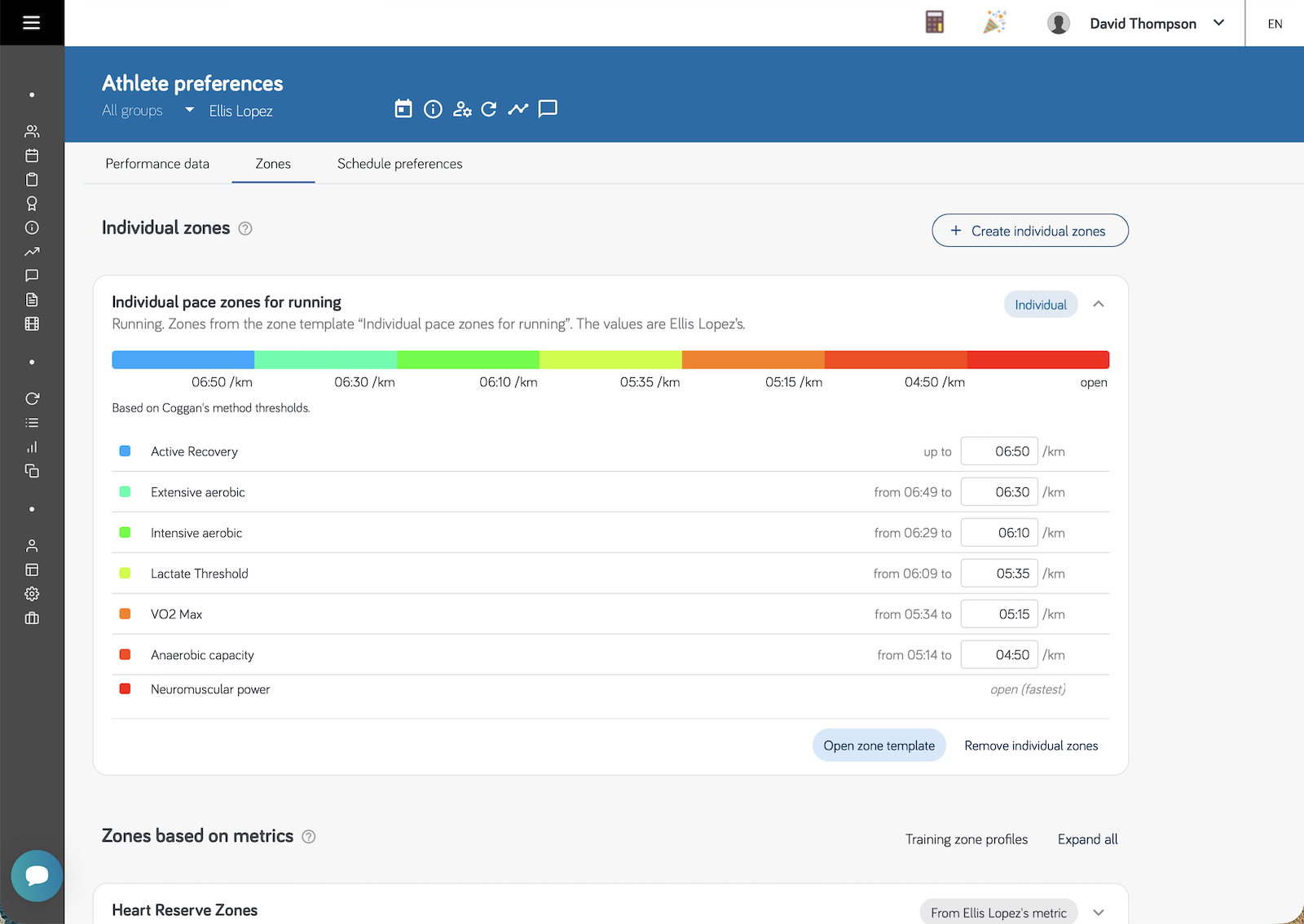
The Zones tab shows the athlete's training zones with the values they come out at for this athlete. It is where a coach fills in an athlete's own zones. How the two kinds of zones work is explained in Training zones.
- Individual zones — the athlete's own values, filled in on a zone template. Values are typed straight into the card and saved when you leave the field. A card with missing values opens itself and says what is missing — until every zone has a value, workouts planned in it show no target. Create individual zones adds another set, from an existing template or as a new one.
- Zones based on metrics — the club's profiles, with this athlete's values calculated from their performance data. A profile whose metric the athlete does not have yet is listed last, and the missing metric can be filled in right on its card — for a heart rate reserve profile, both maximum and resting heart rate.
Changing values on this tab updates the athlete's workouts that are already planned — see Keeping planned workouts up to date.
Coaches with the Manage Templates permission fill in and change an athlete's zones; other coaches see them. Athletes see their zones here but cannot change them. On a phone the tab is read-only for everyone.
Schedule Preferences
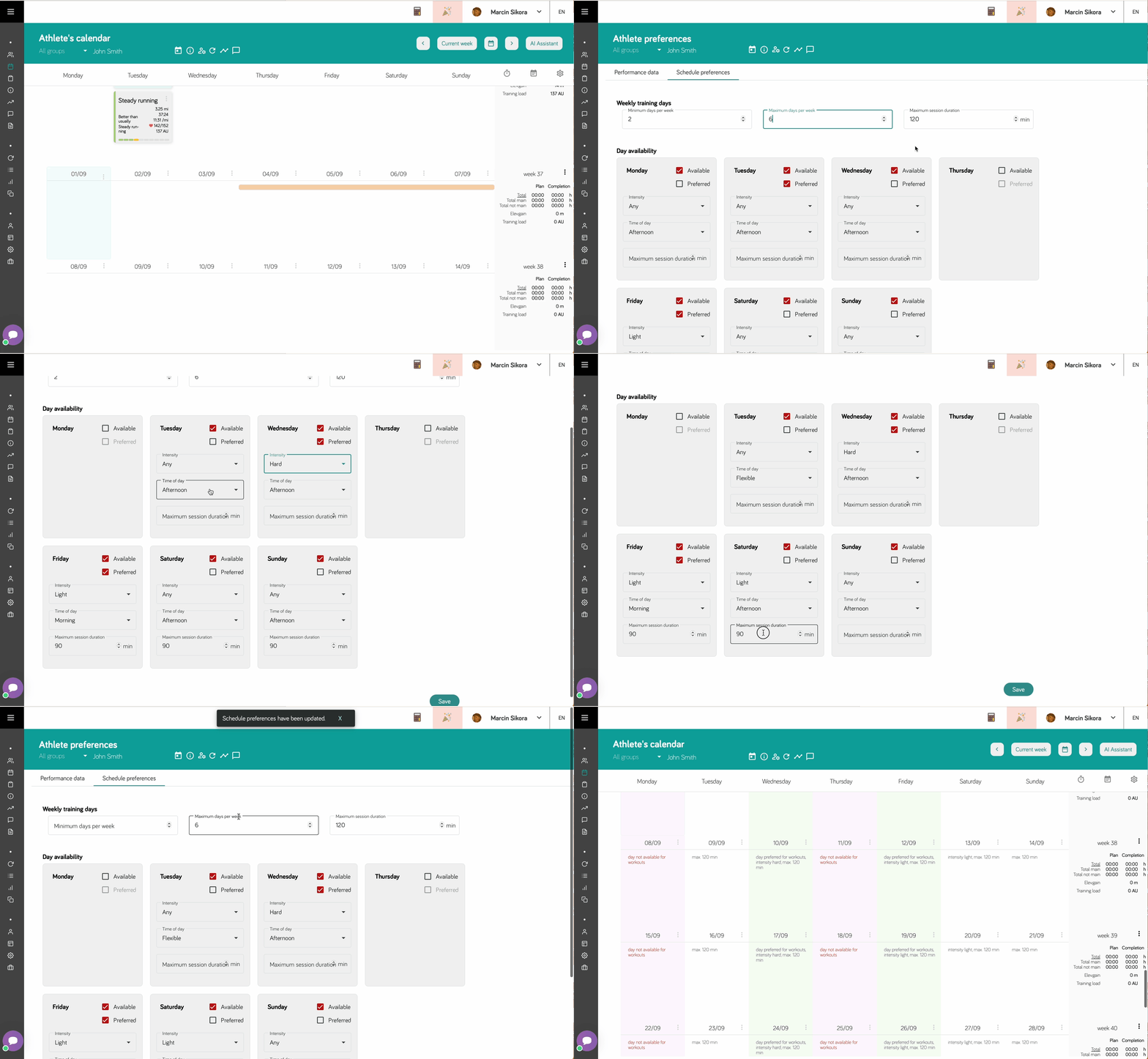
Schedule preferences define when the athlete is available for training. While this section may initially be empty, once completed, it provides valuable guidance to coaches when planning training sessions.
Weekly Training Parameters
You can set general training parameters for the entire week:
- Minimum training days per week: The least number of days you want to train
- Maximum training days per week: The most days you can commit to training
- Maximum session duration: The longest training session you can complete
Daily Availability Settings
For each day of the week, you can specify:
Availability Status
- Not Available: You cannot train on this day
- Available: You can train on this day
- Preferred: You would like to train on this day (among all available days)
Day-Specific Duration
- Set a maximum session duration for specific days
- This overrides the general maximum session duration for that particular day
- If not specified, the general maximum duration applies
Training Intensity Preferences
You can specify your preferred training intensity level. This serves as:
- Guidance for coaches: Helps them understand your intensity preferences
- Convenience tool: Makes training planning more efficient
- Communication aid: Clearly communicates your training preferences
Note that intensity preferences are advisory - coaches may adjust based on your training program and goals.
How Schedule Preferences Work
- Calendar Integration: Your preferences appear on the coach's calendar view
- Training Planning: Coaches see your constraints when scheduling sessions
- Automatic Suggestions: The system can suggest optimal training times based on your preferences
- Conflict Prevention: Helps avoid scheduling training during unavailable times
Best Practices
- Be realistic: Set preferences that match your actual availability
- Update regularly: Adjust preferences as your schedule changes
- Communicate changes: Inform your coach of any temporary schedule modifications
- Use preferred days: Mark days when you have more time or energy for intensive training