Athlete billing
Billing keeps the record of what each athlete pays you — the monthly fee, the single session, the sixteen-week block — inside Good Coach App instead of in a spreadsheet or your bank history. You describe the arrangement once; the app builds the payment schedule from it, shows you who has settled and who hasn't, and — if you want — shows the athlete the same thing together with your account details.
This page is about money your athletes pay you. What you pay for the app is a separate thing entirely — see Settlements and billing.
Billing is for whoever runs the business side of the account:
- On a personal account, that's you — nothing to set up.
- On a club subscription, the Owner always has access; other roles need the Manage Club permission.
A club coach without that permission sees no billing at all — no view mode, no column, no hint that billing exists, not even for athletes they coach themselves. Athletes see only their own arrangement, and only while you leave visibility on.
No money moves through Good Coach App. Nothing is charged, collected, or checked against your bank. You record what happened; the app does the counting and the remembering.
Setting up billing for an athlete
The athletes list can be shown in different views, picked from the view selector above the list. Switch to the Billing view: on desktop choose it from the view dropdown; on mobile tap the filters icon and pick Billing under View mode.
Every athlete now shows their arrangement on their row. Athletes without one show a No billing yet hint and an Add billing button — that button is the way in. It opens a form with:
- Billing type — Monthly, One-off or Fixed-term (see below).
- Amount and Currency — set per athlete, from over fifty currencies. Different athletes can be in different currencies; nothing is ever added up across them.
- Start date — the day the first payment is due. The hint under the field spells the schedule out in words, so you can check it before saving.
- Duration (weeks) — fixed-term only. The end date follows from the start date and the duration; you can also pick the end date you have in mind and the app rounds it to full weeks.
- Name (optional) — what this arrangement is, e.g. 16 weeks to Berlin.
- Note (optional) — context for you. Only you see this note, never the athlete.
- Payment instructions (optional) — how the athlete pays you, as free text: an account number with a transfer title, a BLIK number, a Revolut tag, a PayPal address, a payment link, or "cash before Tuesday's session". Any link in it becomes clickable for the athlete; everything else stays plain text they can copy. Line breaks are kept, so account number and transfer title can sit on separate lines.
- Show billing to the athlete — on for new arrangements. See what the athlete sees.
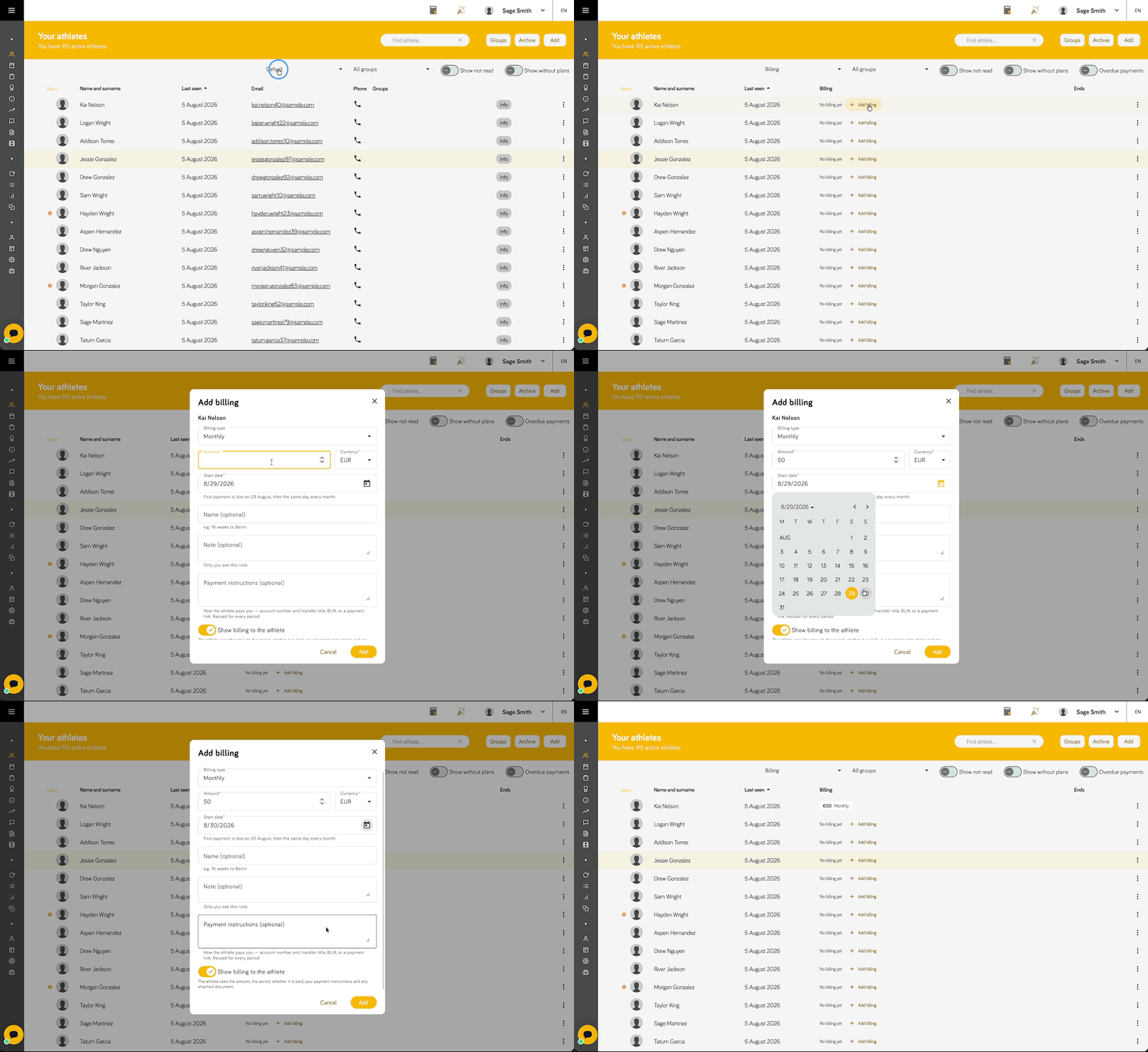
Monthly is an open-ended arrangement that repeats until you pause it. One-off is a single charge. Fixed-term is a bounded block — the point of it is the end date, so you see the engagement finishing in time to have the renewal conversation.
A fixed-term block is billed as one payment for the whole amount. If you want an athlete to pay in instalments across the block, use Monthly instead — the two types stay deliberately distinct.
How payments are scheduled
Coaching is billed in advance, so a payment is due on the day the period it covers starts — not at the end of it. A monthly payment dated 1 September covers September and is due on 1 September.
- Monthly — anchored to the start date, then the same day every month. Each athlete keeps their own billing day; there is no batching to the 1st and no proration for mid-month starts.
- One-off — a single payment on the start date.
- Fixed-term — a single payment for the whole amount on the start date. The duration sets the end date, not how often the athlete is billed.
Month-end dates behave sensibly. An arrangement anchored to the 31st runs 31 January → 28 February → 31 March → 30 April → 31 May: it clamps to the last day where the anchor doesn't exist, then goes back to the anchor. The billing day never drifts earlier month by month.
Backdating works. Give a start date in the past and every payment since then is created straight away, reading as overdue until you mark it paid — which is exactly how you bring an existing athlete into the app mid-arrangement.
A payment is Overdue when its date has passed and it isn't marked paid. That is the only rule; there is no grace-period setting to configure.
The Billing view
Each athlete's row carries the amount, the type, and a status chip for the current payment — Paid, Pending or Overdue, with overdue standing out at a glance. Beside the chip is a tick to mark the payment paid without opening anything; press it again to undo. Any note you left on that payment shows underneath.
Fixed-term arrangements also show when the block Ends, as a plain-language countdown — ends in 12 days, ends today, ended 3 days ago — with a finished engagement styled differently from one still running. Monthly and one-off arrangements leave that column blank.
Two small markers appear where they apply: a Paused badge, and a crossed-out eye for an arrangement that is hidden from the athlete.
To work through the list:
- The Overdue payments filter keeps only athletes with an outstanding payment. It stacks with your other filters, so you can ask "who in my junior squad hasn't paid?" in one go.
- Click the Billing or Ends column heading to sort by it — press again to reverse, a third time to switch sorting off.
On mobile the same content sits on the athlete card, and the filters sheet carries both the view switch and the overdue filter.
Editing an arrangement
Click an athlete's billing row to open it. Everything from the form is editable, and below it sits the list of Periods — every payment the arrangement has produced.
- Changing the amount applies from the next payment. Payments that already exist keep the amount they were created with, so history stays true.
- Moving the start date re-dates the payments that aren't paid yet; the app asks first. Payments you already marked paid keep their original dates.
- The billing type can't be changed. Remove the arrangement and add a new one instead.
- Pause billing stops new payments from being created; the ones that exist keep their status and history. Resume when the athlete comes back.
- Extending a fixed-term block is just raising the duration: the end date moves and no extra payment is created.
- In the periods list you can mark each payment paid or unpaid, leave a note on it (paid in cash, an invoice reference), and give that single payment its own payment instructions where the details differ from the usual ones.
- Remove billing deletes the arrangement and its whole payment history. It can't be undone.
Several athletes at once
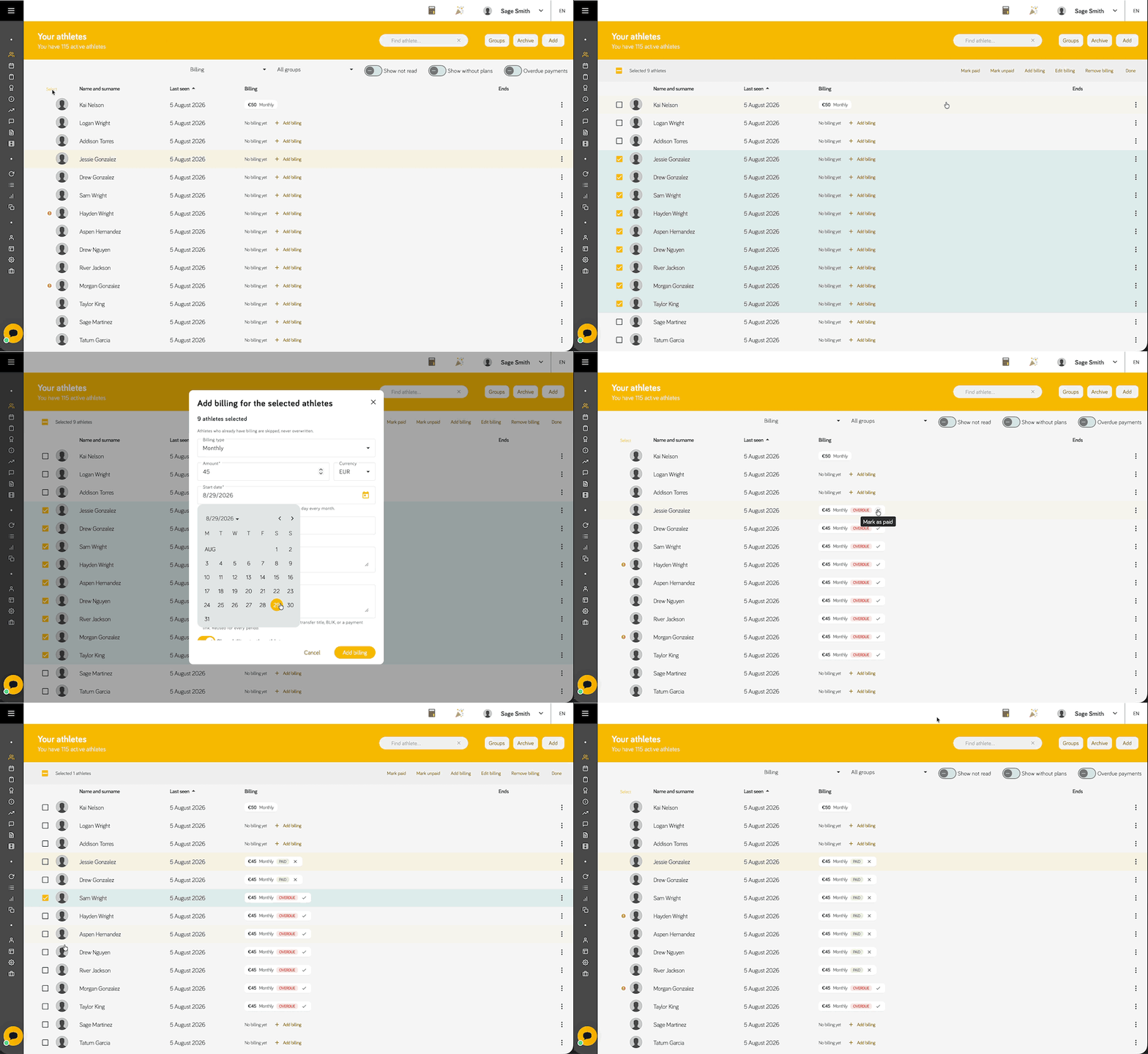
When the same thing applies to a squad, select the athletes on the list and use the bulk actions:
- Mark paid / Mark unpaid the current payment for everyone selected. Athletes with no billing, or whose first payment isn't due yet, are skipped. You can attach the same note to all of them.
- Add billing to everyone selected. Athletes who already have an arrangement are skipped, never overwritten.
- Edit billing across the selection — only the fields you actually change are applied, and type, start date and duration stay per athlete.
- Remove billing from everyone selected, payment history included.
What the athlete sees
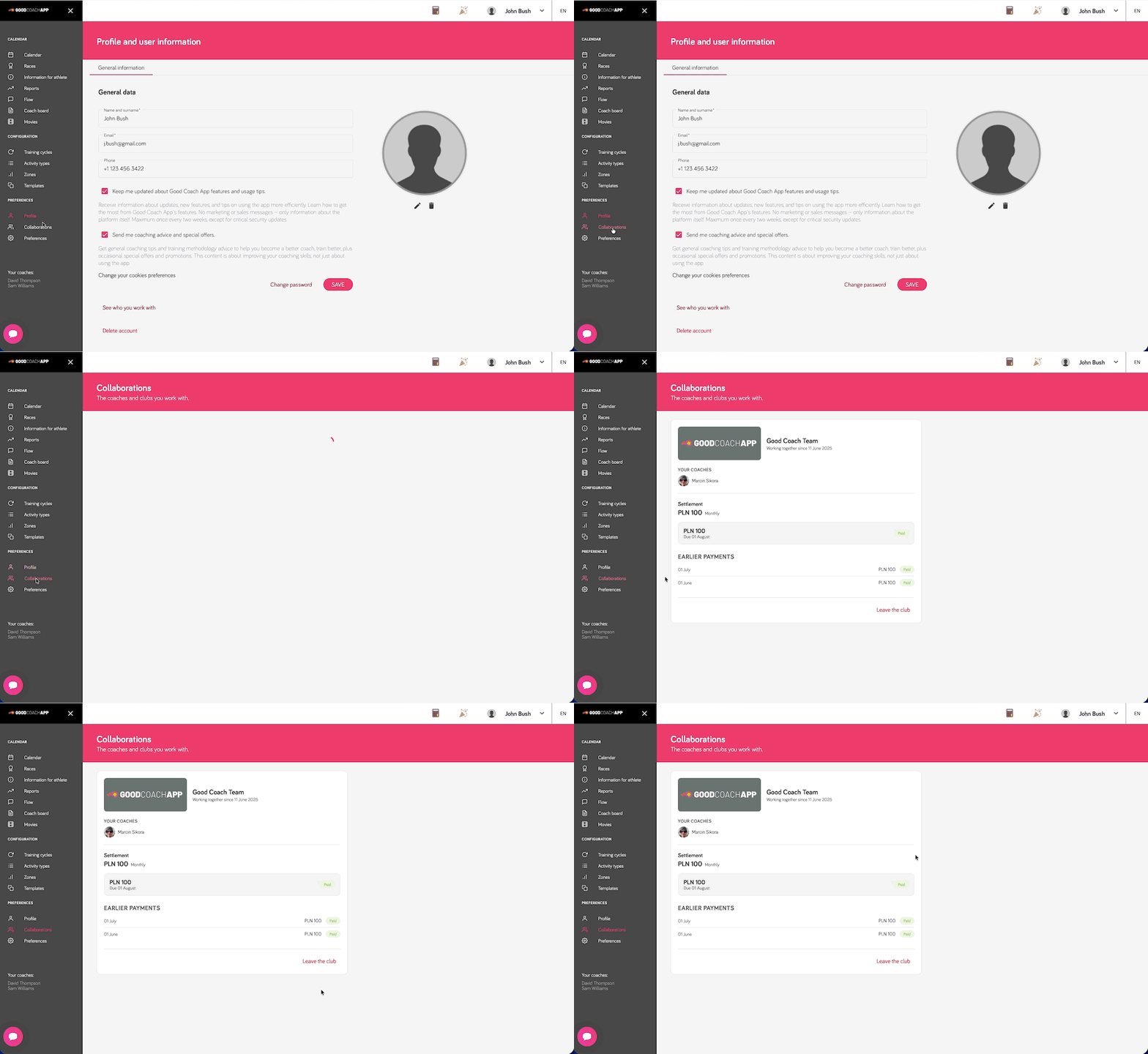
Athletes have their own Collaborations page listing the coaches and clubs they work with. Where you left Show billing to the athlete on, their collaboration with you also carries a Settlement section: the amount and type, the current payment with its due date, and How to pay with your instructions and a copy button — plus their earlier payments.
Some deliberate choices there:
- The athlete only ever sees To pay or Paid. Never overdue — status is something you mark by hand, and the app should not accuse someone who has already paid while you hadn't got round to ticking the box.
- If you left no payment instructions, they are told to settle it the way you agreed rather than shown an empty box.
- Turn the toggle off and the section disappears completely — immediately, for that athlete only.
- Two clubs billing the same athlete produce two independent settlements that never reference each other.
Billing sends no email, no notification and no reminder to the athlete — not automatically, and not on your command. They see their settlement by opening the app, the same way deadlines are visible to you without announcing themselves. Chasing, if it's needed, stays a conversation between you and the athlete.
What billing deliberately doesn't do
- It doesn't take payments. No cards, no payment provider, no money through Good Coach App.
- It doesn't issue invoices or tax documents. Whatever you send your athletes today, you keep sending.
- It doesn't check your bank. A payment is paid when you say it is.
- It doesn't restrict anything. An unpaid or finished arrangement changes nothing about the athlete's plans, calendar or access — that's a decision for you, not the platform.
- It doesn't total anything up. No revenue figures, no monthly totals, and nothing summed across currencies.